C++ (Linux)
Sample Program Overview
The C++ sample programs are located at VcameraSDK-X.X.X/cpp/example and include:
ConnectByIpAddress.cpp: Opens a network camera by IP address.DepthToPointCloud.cpp: Converts depth images to point clouds in real time during continuous capture.DumpAllFeatures.cpp: Lists the features supported by the camera.DumpDeviceInfo.cpp: Lists camera information.FetchFrame.cpp: Captures depth images in continuous capture mode.FullExample1.cpp: Converts depth data to 3D point clouds in real time in software trigger mode.ImageRegistration.cpp: Aligns the output depth image with the color image in software trigger mode.ListDevices.cpp: Lists all cameras connected to the computer.LoadFeaturesFromFile.cpp: Loads camera feature settings from a specified JSON file and applies them to the camera.LoadFeaturesFromStorage.cpp: Loads feature settings from the camera Storage area. This sample applies only to non-GenICam cameras.LogConfig.cpp: Configures the Vcamera SDK logging system.ReadCalibInfo.cpp: Reads calibration parameters for a specified sensor.ReadWriteFeatures.cpp: Demonstrates how to read and write camera features.SaveFeaturesToFile.cpp: Saves updated feature settings to a specified JSON file.SaveFeaturesToStorage.cpp: Saves feature settings to the device Storage area. This sample applies only to non-GenICam cameras.SetIpAddress.cpp: Sets a static IP address.SetUndistortion.cpp: Captures and outputs distortion-corrected left grayscale images and color images after receiving a software trigger command.SoftTrigger.cpp: Captures and outputs depth images after receiving a software trigger command.UserSetSelector.cpp: Selects a user set. This sample applies only to GenICam cameras.ReconnectWhenOffline.cpp: Automatically reconnects the camera after disconnection and resumes image acquisition.
Install Dependencies
Dependency 1 — CMake
Install CMake by entering the following command in the terminal:
sudo apt-get install cmake
Verify the installation by checking the version information.
cmake --version
Note
The recommended CMake version is 3.24.0 (it has passed compatibility testing; other versions have not been fully tested and compatibility is not guaranteed).
Dependency 2 — OpenCV (Optional)
If you need image processing functions (such as image saving), install OpenCV. If OpenCV is not installed, OpenCV-dependent sample programs will be skipped automatically during compilation, without affecting the overall compilation and running of the samples.
sudo apt-get install libopencv-dev
Note
The recommended OpenCV version is 4.9.0 (it has passed compatibility testing; other versions have not been fully tested and compatibility is not guaranteed).
Dependency 3 — USB Permissions (Optional)
If you use a USB camera, complete the Set Up USB Camera Environment steps before proceeding.
Compilation and Execution
Compile the sample programs.
cd example
mkdir build && cd build
cmake .. -DCMAKE_BUILD_TYPE=Release
make -j4
Note
The cmake command supports the following options:
For Release build (recommended):
-DCMAKE_BUILD_TYPE=ReleaseFor Debug build:
-DCMAKE_BUILD_TYPE=DebugSpecify the OpenCV library path during compilation:
-DOpenCV_DIR=/path/to/opencv/build. Replace /path/to/opencv/build with the directory containing OpenCVConfig.cmake, for example-DOpenCV_DIR=/opt/opencv4.9/lib/cmake/opencv4.
If OpenCV is not installed, OpenCV-dependent sample programs will be skipped automatically during compilation.
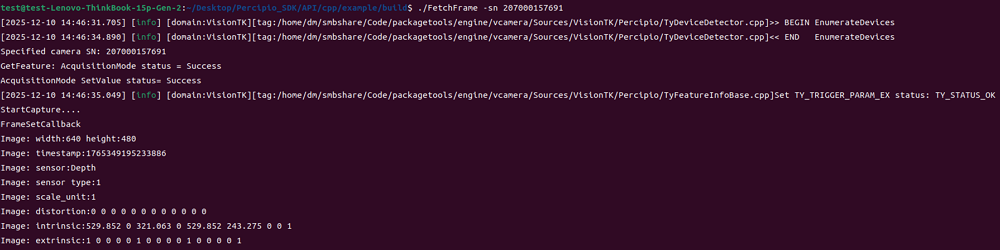
Run the program.
./FetchFrame -sn <camera serial number>