Set Up Control Flow
Control flow sets the trigger conditions for running steps, so you can execute steps in conditional branches.
Context
Steps generally run in data flow order from top to bottom. While using steps, you can also configure control flow to manage when steps or workflows trigger. If you connect a control flow to a step, the step only runs when the control flow triggers. If the control flow doesn’t trigger, the step doesn’t run.
When configuring vision projects, it’s common to add branches to the project. Different branches correspond to different vision processing workflows. Different rules trigger different branches, so the project runs different vision processing workflows in different situations.
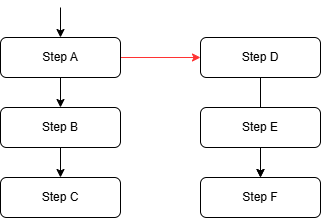
The figure below shows two vision processing workflows in a vision project, A → B → C and D → E → F. The red arrows represent control flow.
When the control flow doesn’t trigger, only the A → B → C workflow runs. When the control flow triggers, running step A also triggers the D → E → F workflow.
Connection Points
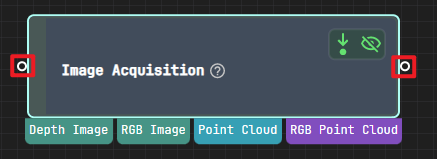
As shown in the figure below, the small circles on both sides of a step are the control flow connection points. The left connection point handles incoming control flow. Output from other steps can trigger it. The right connection point handles outgoing control flow and can trigger subsequent steps.
Attention
Connect input and output control flow as needed. It’s not necessary to connect all of them.
Scenarios
Trigger Control Flow Based on Boolean Value
The Trigger Control Flow Based on Boolean Value step usually handles triggering operations. This step typically works with steps that output boolean values, such as the Dichotomize Value by Threshold step.
Trigger Control Flow Based on the Presence of Output
When running a vision project, you may encounter situations where a step has no output. If the project has multiple vision processing workflows, you can use the related settings to trigger another branch to run. Similarly, you can trigger another branch to run when a step has output.
When you configure the project, first check Trigger Control Flow When Has Output or Trigger Control Flow When No Output in the Execution Flags parameters of Step Parameters.