Save Data
To help you reproduce issues encountered on site and run thorough regression checks before leaving the site, RVS 2.0 provides a data storage feature that automatically saves images, the output results of the current project, and parameter recipe data.
Procedures
Open a project, click the Project Assistant tab in the project configuration pane at the lower-right corner of the home screen. Then click
 to open the Data Storage tab.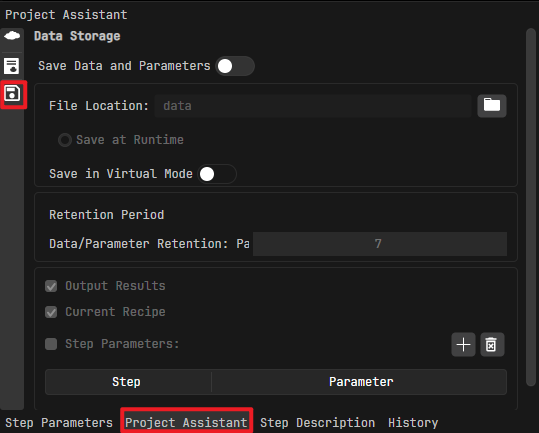
Enable Save Data and Parameters.
After this switch is enabled, runtime data is automatically saved to the specified path when the project runs.
Attention
If the current project has no data storage-relevant steps, only parameter recipe data is saved.
The feature supports multiple cameras. If the RVS 2.0 project contains multiple Image Acquisition steps, data from all cameras is saved automatically.
Configure the parameters as needed.
File Location
Data is stored by default in the
datafolder under the project directory. Click to customize the storage path. Select a disk path with sufficient storage space.
Save at Runtime
This is enabled by default when the Save Data and Parameters switch is enabled.
Save in Virtual Mode
When enabled, data is saved while the camera runs in virtual mode.
Retention Period
Sets the number of days for which data and parameters are retained. Data older than the specified period is deleted automatically.
Add/Delete Parameter List
Output results and current recipe data are saved by default. To save specified step parameters, select Step Parameters, click
 to open the Select Step Parameters dialog. Select the step parameters as needed and click OK.
To remove a selected step parameter, select it in the list and click
 .
.Override Parameters in Virtual Mode
When enabled, the system reads the property file from saved data during virtual-mode replay, extracts historical parameter values, and overwrites the corresponding step parameters in the current project. All parameters defined in the properties files are included.
Saved Data Description
Saved data includes:
Data Storage Configuration File:
config/data_storage_config.jsonunder the project directory. It records the storage path, retention period, and virtual-mode settings.Image Data: Image data output by the Image Acquisition step, including color and depth images. They are stored as
.pngfiles in<camera ID>-color/and<camera ID>-depth/.Depth image:
depth_image_YYYYMMDD_HHmmss_fff.pngColor image:
color_image_YYYYMMDD_HHmmss_fff.png
Calibration Data: Intrinsic calibration data output by the Image Acquisition step, stored as JSON files under
<camera ID>/.Color image intrinsics:
color_Intrinsic.jsonDepth image intrinsics:
depth_Intrinsic.jsonLeft IR image intrinsics:
left_ir_Intrinsic.jsonRight IR image intrinsics:
right_ir_Intrinsic.json
Step Parameter Data: Step parameters selected in the Data Storage tab, stored as JSON files under
properties/with names in the formatproperty_YYYYMMDD_HHmmss_fff.json. Each property file contains:name: Parameter nameproject_id: Project numberrecipe_name: Recipe nametype: Parameter typevalue: Parameter value
Error Data: When an error occurs during project execution, the system saves images, calibration data, and step parameter data to
data/error_datafor troubleshooting and reproduction. The structure iserror_data/<error timestamp>/and includeserror_msg.json, camera calibration snapshots, color and depth images, CSV traceback files, and property files.Output Results: When the project contains a custom Vision Output step, results are stored as JSON files under
outputs/with names in the formatoutput_YYYYMMDD_HHmmss_fff.json. The JSON records the key-value pairs of the output ports.
A complete saved-data structure is shown below:
<Project 1>/
├── config/
│   └── data_storage_config.json    # Data storage configuration
├── data/                            # Normal data directory
│   └── <YYYY-MM-DD>/               # Organized by date
│       ├── <camera ID>/             # Calibration parameters
│       │   ├── color_Intrinsic.json
│       │   ├── depth_Intrinsic.json
│       │   ├── left_ir_Intrinsic.json
│       │   └── right_ir_Intrinsic.json
│       ├── <camera ID>-color/       # Color images
│       │   └── rgb_image_*.png
│       ├── <camera ID>-depth/       # Depth images
│       │   └── depth_image_*.png
│       ├── csv/                     # Traceback files
│       │   └── step_parameter_*.csv
│       ├── outputs/                 # Output results
│       │   └── output_*.json
│       └── properties/              # Step properties
│           └── property_*.json
│   └── error_data/                  # Error data directory
│       └── <YYYY-MM-DD>/            # Organized by error timestamp
│           ├── error_msg.json       # Error information
│           ├── <camera ID>/         # Calibration parameters at error time
│           ├── <camera ID>-color/   # Color image at error time
│           ├── <camera ID>-depth/   # Depth image at error time
│           └── properties/          # Property files at error time
└── <project name>.VisionProject    # Project file