Project List

The project list shows the current solution and all projects in it. As shown below, 1 marks the solution name and 2 marks the project name. A solution can contain multiple projects.
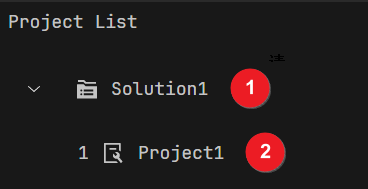
Project List

Solution Context Menu

Right-click the solution name to open its context menu.

The options are as follows:

Option

Description

Open Solution Folder

Open the folder where this solution is located in the file system.

New Project

Select Vision Project to create a new, empty project within the solution.

Rename Solution

Rename the solution.

Reset Project IDs

Reset the adjusted project IDs in ascending order. If project IDs become non-consecutive (e.g., after deleting a project in the middle), click this option to restore them to consecutive numbers.

Add to Solution Assistant

Add the solution to the Solution Assistant for central management.

See also

For more, see Managing Solutions.

Project Context Menu

Right-click the project name to open its context menu.

The options are as follows:

Option

Description

Open Project Folder

Open the folder where this project is located.

Rename Project

Rename the project.

Delete Project

Delete the project.

Duplicate Project

Create a copy of the project.

See also

For more, see Managing Projects.