Extract Point Cloud Inside Cuboid
Function Description
This step is used to extract point clouds within a specified cuboid range and filter out point cloud data outside the range.
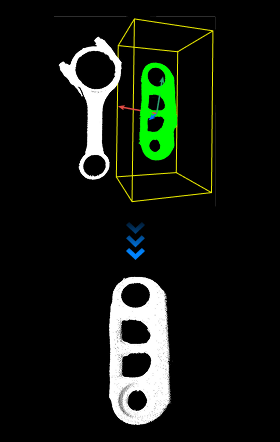
Use Cases
This is a general-purpose point cloud extraction step with no fixed application scenario.
Inputs
Point Cloud (Required): Point cloud to be extracted.
Box Pose (Required): Defines the position and pose of the cuboid center point.
Half Length of Box on X Axis (Optional): Defines the half-length of the cuboid along the world coordinate system X axis, in millimeters (mm).
Half Length of Box on Y Axis (Optional): Defines the half-length of the cuboid along the world coordinate system Y axis, in millimeters (mm).
Half Length of Box on Z Axis (Optional): Defines the half-length of the cuboid along the world coordinate system Z axis, in millimeters (mm).
Outputs
Extracted Point Cloud: Point cloud located inside the cuboid.
Parameters
Box Size Settings
Half Length on X Axis
Default value: 100 mm
Adjustment description: This parameter defines the half-length of the box along the world coordinate system X axis, in millimeters (mm). This parameter takes effect when there is no input at the “Half Length of Box on X Axis” port.
Half Length on Y Axis
Default value: 100 mm
Adjustment description: This parameter defines the half-length of the box along the world coordinate system Y axis, in millimeters (mm). This parameter takes effect when there is no input at the “Half Length of Box on Y Axis” port.
Half Length on Z Axis
Default value: 100 mm
Adjustment description: This parameter defines the half-length of the box along the world coordinate system Z axis, in millimeters (mm). This parameter takes effect when there is no input at the “Half Length of Box on Z Axis” port.
Usage of Input Point Cloud
OneToOne
Function: Matches point cloud list and box pose list in index order, and performs region extraction for each pair of point cloud and cuboid.
Applicable scenario: When the number of point clouds matches the number of cuboids and needs one-to-one processing.
Example: 3 point clouds + 3 poses -> Each point cloud is filtered using its corresponding cuboid.
FirstToAll
Function: Combines the first point cloud with all box poses to obtain multi-region extraction results based on the same point cloud.
Applicable scenario: When a single point cloud needs to be repeatedly extracted using multiple cuboids at different positions.
Example: 1 point cloud + 3 poses -> The same point cloud is filtered by 3 different cuboids respectively.
AllToFirst
Function: All input point clouds are uniformly extracted using the region defined by the first box pose.
Applicable scenario: When multiple point clouds need to be uniformly filtered using the same spatial range.
Example: 3 point clouds + 1 pose -> All point clouds use the same cuboid range.