Estimate Point Cloud Edges by 3D Method
Function Description
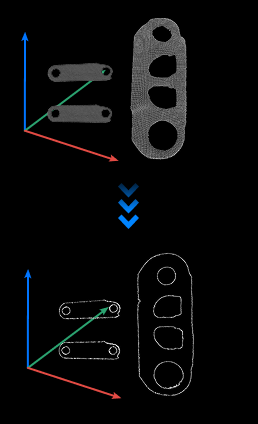
This step uses a 3D method to extract edges from the input point cloud data.
Use Cases
This step is generally used for edge point cloud matching.
Inputs
Point Cloud with Normals: Point cloud for edge estimation.
Outputs
Point Cloud Edges: Extracted point cloud edges.
Point Cloud Edge Extraction Process
The process for extracting point cloud edges is as follows:
Search for K neighboring points near a point.
Connect the point with neighboring points in sequence.
Calculate the angles between adjacent connecting lines and take the maximum value.
If the maximum angle is greater than the set threshold, the point is determined as an edge point.
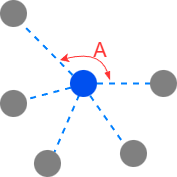
As shown in the figure below, the blue point is the point to be judged, and the gray points are the found neighboring points. Setting the angle threshold to 90°, if the maximum angle ∠A in the figure is > 90°, the blue point is determined as an edge point.
Parameters
Edge Evaluation Settings
Angle Threshold
Used to determine whether a point is an edge point. Among the lines connecting a point to its found neighboring points, if the maximum angle formed by two adjacent lines is greater than this value, the point will be determined as an edge point.
It is recommended to use the default value of 90°.
Neighbor Point Search Settings
Neighbor Point Search Method
Currently only supports KNN search method for finding neighboring points. That is, find the K nearest neighboring points in 3D space.
Number of Neighbor Points
This parameter is used to determine the K value. It determines the number of neighboring points considered when analyzing each point.
It is recommended to use the default value of 20.
Debugging Suggestions: Generally start with default parameters first. If there is too much noise, prioritize fine-tuning the angle threshold; if edges are severely broken, appropriately increase the number of neighboring points, but be wary of decreased positioning accuracy.