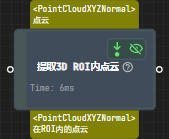
Extract 3D Points in 3D ROI
Function Description
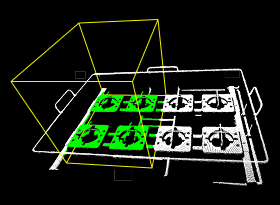
Uses 3D ROI (Region of Interest) to perform spatial filtering on the input point cloud. Only point cloud data within the 3D ROI region is retained, and point clouds outside the region are filtered out.
Use Cases
General-purpose point cloud filtering step. Can be used to focus on the point cloud region of target objects, effectively removing background interference point clouds, and improving the efficiency of subsequent processing steps.
Inputs
Point Cloud with Normals: Point cloud to be processed.
Outputs
Point Cloud with Normals: Point cloud data retained after 3D ROI filtering.
Parameters
Set Point Cloud Type
This parameter is used to set the type of input point cloud.
PointXYZNormal: Input point cloud with normal information.
PointXYZ: Input point cloud without normal information.
3D ROI Settings
3D ROI
Click the “Open Editor” button to set the 3D ROI in the Set 3D ROI interface.
For specific setting steps, please refer to Set 3D ROI.
Input Point Cloud Coordinate System Type
Change the coordinate system of the input point cloud.
Value list: CameraFrame (camera coordinate system), RobotFrame (robot coordinate system).
Empty Status Settings
Minimum Point Count in 3D ROI
This parameter needs to be set after checking the “Send whether point in 3D ROI is empty” parameter. Used to determine whether there is no object in the 3D ROI or an object is not recognized.
Send Whether Point in 3D ROI is Empty
Checked: When the point count in ROI is less than “Minimum Point Count in 3D ROI”, sends an empty state notification.

Unchecked: Does not send notification.