Point Filtering
Function Description
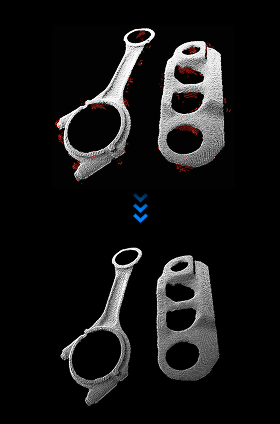
This step filters point clouds according to user-specified rules. Points that do not conform to the rules will be filtered out.
Use Cases
This step is generally applied in the point cloud preprocessing stage. It can effectively remove obvious outliers and other interfering parts in the point cloud, facilitating subsequent point cloud clustering and other operations.
Inputs
Point Cloud with Normals: Point cloud to be filtered.
Outputs
Point Cloud with Normals: Point cloud after filtering.
Parameters
Point Filtering Method Type
NormalsFilter: Based on the given reference direction, calculates the angle between the normal of each point in the point cloud and the reference direction (unit: degrees), and filters out point clouds outside the angle range. Recommended when point clouds need to be layered or to avoid adhesion.
StatisticalOutlierFilter: According to given parameters, removes points outside the range. Recommended when point clouds have obvious outliers.
NormalsFilter
When point filtering method type is set to NormalsFilter, the following parameters need to be set:
Reference Coordinate System: Select the coordinate system where the reference direction is located.
CameraFrame: The vector representing the reference direction is in the camera coordinate system.
RobotFrame: The vector representing the reference direction is in the robot coordinate system.
Reference Direction X Value: Set the X component of the reference direction.
Reference Direction Y Value: Set the Y component of the reference direction.
Reference Direction Z Value: Set the Z component of the reference direction.
Minimum Angle Difference:
Set the lower limit of the angle with the reference direction (degrees). If the angle between the point normal vector and the reference direction is less than this threshold, the point will be filtered.
Maximum Angle Difference:
Set the upper limit of the angle with the reference direction (degrees). If the angle between the point normal vector and the reference direction is greater than this threshold, the point will be filtered.
StatisticalOutlierFilter
When point filtering method type is set to StatisticalOutlierFilter, the following parameters need to be set:
Number of Nearest Neighbors:
Set the number of neighboring points for each search. Larger values result in more points used for calculating the average distance, stronger point filtering effect, but may lose point cloud details; smaller values may result in incomplete point filtering. Can be appropriately increased when point clouds are dense, and appropriately decreased when sparse.
Default value is 30. Using the default value is recommended.
Standard Deviation Multiplier:
Set the threshold for determining outliers. Smaller values mean stricter filtering conditions and more points removed; larger values mean looser filtering conditions and more points retained. If valid points are being overly deleted, this parameter can be appropriately increased.
Default value is 2.0. Using the default value is recommended.