Rotate Poses Around Axis by Angle
Function Description
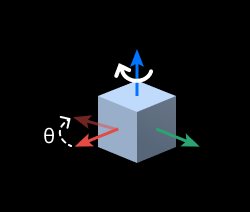
Rotates the input pose around a specified axis by a specified angle.
Use Cases
General-purpose pose adjustment step, used to output poses after rotating around a specified axis.
Inputs
Original Poses (Required): Pose to be rotated.
Customized Axis (Optional): The pose will rotate around the axis specified by this port. When this port is used, the “Axis Settings” related parameters are invalid.
Customized Angle (Optional): Specifies the pose rotation angle. When this port is used, the “Rotation Angle” parameter is invalid.
Outputs
Rotated Poses: List of poses obtained after rotating the original pose around the specified axis (PoseList).
Workflow
Input Pose → Select Coordinate System → Specify Rotation Axis → Set Rotation Angle → Execute Rotation Transform → Output Rotated Pose
Parameters
Specify Coordinate System
Selects the reference coordinate system for the rotation operation: camera coordinate system, robot coordinate system.
Axis Settings
When the “Customized Axis” input port has no input, the “Axis Settings” related parameters take effect.
Axis to be Fixed
X/Y/Z: Rotates around the standard coordinate axis X/Y/Z.
Customized: User-defined rotation axis direction.
Specify Reference Direction
When “Axis to be Fixed” is set to “Customized”, the custom axis direction vector needs to be specified.
Angle Settings
Rotation Angle
Defines the rotation angle size. Rotation follows the right-hand rule (thumb points in the axis direction, fingers bending direction is the positive angle). This parameter takes effect when the “Customized Angle” input port has no input.
Other Settings
Ignore Invalid Direction Vectors with Zero Magnitude
After checking, if the direction vector length is 0 (invalid vector), the system will automatically ignore that vector, avoiding calculation errors caused by abnormal input data.
Examples
Example 1: Rotate 90° Around the Z Axis of the Robot Coordinate System
Coordinate System Settings: Robot coordinate system
Axis to Fix: Z
Rotation Angle: 90
Example 2: Rotate Around a Custom Axis in the Camera Coordinate System
Coordinate System Settings: Camera coordinate system
Axis to Fix: Custom
Reference Direction: [1, 1, 0]
Rotation Angle: 45
Ignore Invalid Vectors: true