Validate Poses by Included Angles to Reference Direction
Function Description
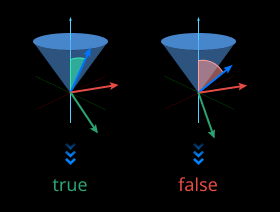
Calculates the angle between a specified axis of the pose and the reference direction. If the angle is less than or equal to the set maximum angle difference, the pose is retained and the judgment result is True; otherwise, it is eliminated and the judgment result is False.
Use Cases
General-purpose pose filtering step.
Inputs
Pose (Required): PoseList - list of poses to be validated.
Reference Pose (Optional): Specifies a reference pose in the world coordinate system, and uses its specified reference axis as the reference direction to determine whether the input poses are valid.
Reference Direction (Optional): Specifies a reference direction to determine whether the input poses are valid.
Outputs
Judgment Result: Boolean list representing the judgment results.
Valid Poses: List of poses determined to be valid.
Parameters
Visualization Settings
Display Point Cloud in Selected Coordinate System: Select to display point clouds in robot or camera coordinate system.
Others
Coordinate System: Selects the coordinate system where the reference direction is located. Currently only supports WorldCoordinate.
Reference Direction Source
Determines the type of the second input: Reference Pose (Pose) or Reference Direction (Vector3D).
Reference Direction
When “Reference Direction Source” is “Vector3D” and the second input is connected, this parameter is invalid.
When “Reference Direction Source” is “Pose” and the second input is connected, specify the reference axis and axis direction through this parameter (X Positive, X Negative, Y Positive, Y Negative, Z Positive, Z Negative).
When the second input is not connected, set this parameter to “Custom” and set the X/Y/Z values of the reference direction.
Axis to Specify
Specifies the axis in the input pose used to calculate the angle with the reference direction.
Maximum Angle Difference (0~180)
When the angle between the specified axis of the input pose and the reference direction is less than or equal to this value, the input pose is determined to be valid.
Reference Direction
When “Reference Direction” is set to “Custom”, set the following parameters.
X: Sets the X-axis component of the reference direction.
Y: Sets the Y-axis component of the reference direction.
Z: Sets the Z-axis component of the reference direction.