Filter Poses by ROI
Function Description
Used to filter out poses that are not within the 3D Region of Interest (3D ROI).
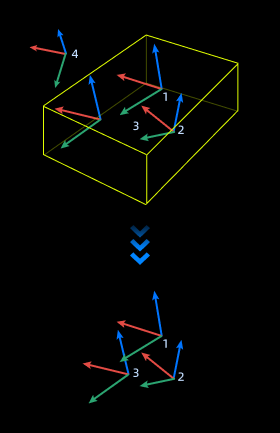
Use Cases
A general-purpose step for pose filtering.
Inputs
Pose: Pose list to be filtered.
Outputs
Valid Pose: Poses located within the 3D ROI.
Judgment Result: Boolean list representing the judgment results.
Parameters
3D ROI Settings
Open the point cloud display in the project assistant. Click the “Open Editor” button to set the 3D ROI in the “Set Target Region” window.
For specific setting steps, please refer to Set 3D ROI.
Coordinate System Type of Input Poses
Sets the coordinate system where the input poses are located, either camera coordinate system or robot coordinate system.
Display Pose Type
Before: Displays input poses.
After: Displays only output poses.
All: Displays both input and output poses.