Manage Target Object List
If there are already target objects in the currently opened solution, after opening the Target Object Editor, the Target Object List will be displayed on the left side of the interface.
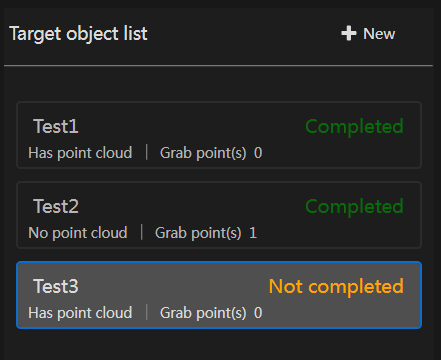
The Target Object List supports the following operations:
Create New Target Object
Click the +New button to select a target object creation method, choose the creation method, and follow the process to complete target object model editing. After editing, click Save. The newly created target object model will appear in the Target Object List.
View Target Object Status
The Target Object List displays the following status information to help you quickly understand the target object situation:
Incomplete: The target object creation process has not yet finished.
Completed: The target object has been fully created and saved.
No Point Cloud: No point cloud data was acquired through the camera or imported via file during target object creation.
Has Point Cloud: Point cloud data was acquired through the camera or imported via file during target object creation.
Pick Points N: This target object model has N pick points set.
Delete Target Object
Select the target object in the Target Object List, right-click and select Delete to remove it.
Edit Target Object
Select the target object to be modified, click the Previous button to return to the corresponding creation step, re-edit the target object model, and save the update.
Rename Target Object
Select the target object in the Target Object List, right-click and select Rename to modify the target object name.