Flip Pose Coordinate Directions
Function Description
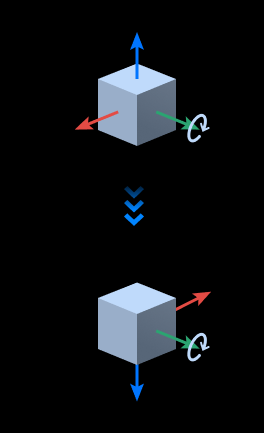
Fixes one axis of the pose and flips another axis to a specified direction.
Use Cases
This step is commonly used during pose post-processing to align a chosen axis of all poses to the same direction.
Inputs
Pose: Poses whose direction is to be adjusted.
Outputs
Pose: Poses after direction adjustment.
Parameters
Visualization Settings
Display Point Cloud in Selected Coordinate System
Supports displaying point clouds in robot coordinate system/camera coordinate system.
Pose Display Settings
Before: Displays only poses before flipping.
After: Displays only poses after flipping.
All: Displays both poses before and after flipping.
Coordinate Axis Settings
Axis to Flip
Selects the type of coordinate axis that needs to be flipped.
Direction Type
The direction that the axis to be flipped points to.
Negative (If you want to adjust a certain axis of the pose to the negative direction in the world coordinate system, only axes with an angle greater than 90° from the negative direction will be adjusted); Positive (If you want to adjust a certain axis of the pose to the positive direction in the world coordinate system, only axes with an angle greater than 90° from the positive direction will be adjusted).
For example, if the Axis Type to Flip in parameters is Z, and Direction Type is Positive, then the Z axis of poses with an angle less than 90° from the positive direction of the world coordinate system Z axis will not be adjusted, and the Z axis of poses with an angle greater than 90° will be flipped 180° around the reference axis.
Axis to Fix
Selects which axis to rotate around. The axis to flip and the axis to fix cannot be the same axis.