Downsample Point Cloud
Function Description
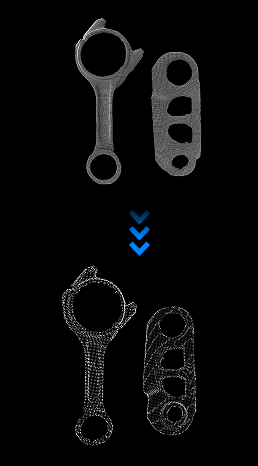
Performs sparsification processing on point clouds, reducing the number of points while retaining the overall shape features of the point cloud.
Use Cases
This step is typically used during point cloud preprocessing. When a lower-density point cloud is sufficient for the task, downsampling can reduce runtime while preserving the overall shape needed for later processing.
Inputs
Point Cloud with Normals: Original point cloud containing normal information.
Outputs
Reduced Point Cloud with Normals: Point cloud with normals after downsampling.
Parameters
Set Point Cloud Type
Select the type of input point cloud.
PointXYZNormal: (Default) Input point cloud contains normal information.
PointXYZ: Input point cloud does not contain normal information.
Sampler Type
Sampler Type
Select the downsampling method for the point cloud.
VoxelGridSampler: Voxel sampling method, which divides the point cloud space into uniform 3D grids (voxels), calculates the average position and normal of all points within each voxel, generates a new representative point using this average value, and discards other points to reduce point cloud density. This downsampling method retains edge details more completely but does not retain camera intrinsic parameters.
ResolutionReductionSampler: (Default) Reduces point cloud resolution, arranges the point cloud in 2D rows and columns, and samples points at fixed steps. This downsampling method retains camera intrinsic parameters but does not retain edge details.
Sampling Interval
When VoxelGridSampler is selected, the sampling interval needs to be set. This parameter sets the edge length of the voxel grid during downsampling. Larger values result in sparser downsampled point clouds and less retained details.
Row Step
When ResolutionReductionSampler is selected, the row step needs to be set. This parameter sets the step size in the row direction during downsampling. Larger values result in sparser downsampled point clouds and less retained details.
Column Step
When ResolutionReductionSampler is selected, the column step needs to be set. This parameter sets the step size in the column direction during downsampling. Larger values result in sparser downsampled point clouds and less retained details.