Translate Poses Along Given Direction
Function Description
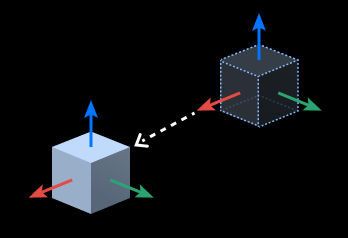
Translates input poses along a specified direction.
Use Cases
General-purpose pose adjustment step, used to translate poses according to specified direction and distance.
Inputs
Original Pose (Required): Pose to be moved.
Move Distance (Optional): Movement distance of the pose (when not connected, uses “Move Distance” in parameters).
Outputs
Translated Pose: Result after translating the original pose along the specified direction.
Parameters
Visualization Settings
Display Point Cloud in Selected Coordinate System
When debug output is enabled, poses are displayed in the selected coordinate system.
Robot Coordinate System
Camera Coordinate System
Input Usage Settings
Correspondence Type
Specifies the matching method between original poses and move distances.
All: Each original pose corresponds to a distance in the move distance list in order (requires the same quantity of both).
FirstOnly: All original poses are translated according to the first value in the move distance list.
Translation Direction Settings
Move Distance
Sets the pose translation distance, in millimeters (mm).
Reference Coordinate System
Selects the coordinate system on which the translation direction is based.
Worldcoordinate: The reference direction is the direction vector in the base coordinate system.
ObjectCoordinate: The reference direction is the direction vector in the original pose’s own coordinate system.
Reference Direction
Selects the specified method for the translation direction.
CustomizedDirection: Translates along Custom Direction (X/Y/Z).
ObjectAxis: Translates along a specified axis. Need to select the Specified Axis according to actual situation.
Custom Direction
X/Y/Z: When Reference Direction is CustomizedDirection, X/Y/Z together form the custom translation direction vector.
Specified Axis
X/Y/Z: When Reference Direction is ObjectAxis, selects along which axis of the original pose’s own coordinate system to translate.