Rotate Poses Axes to Specified Directions
Function Description
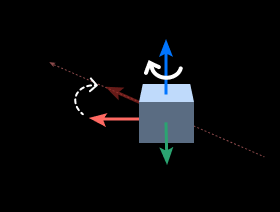
Used to adjust input poses so that their specified axis points to the target direction.
Use Cases
General-purpose pose direction adjustment step, also used for rotating poses of symmetric objects according to symmetry.
Inputs
Original Pose (Required): Pose to be rotated.
Custom Direction (Optional): Provides reference direction. Input type is specified by the “Input Data Type” parameter.
Outputs
Rotated Pose: List of poses after rotation.
Parameters
Visualization Settings
Display Point Cloud in Selected Coordinate System
When debug output is enabled, poses are displayed in the selected coordinate system.
Robot Coordinate System
Camera Coordinate System
Rotation Settings
Axis to Rotate
Selects the axis of the input pose that needs to be rotated.
Axis to Fix
Selects the axis of the input pose that remains fixed during rotation.
Selecting None means no fixed axis, and the axis to be rotated can directly point to the reference direction.
Symmetry Settings
(Only displayed when “Axis to Fix” is not None.)
Consider Object Symmetry
After checking, symmetry angle constraints take effect.
Symmetry Angle (0~360)
Defines the rotation symmetry period of the object around the fixed axis. If the object under test has symmetry, the object remains unchanged after rotating along the fixed axis by this angle.
When Specified Direction Comes from Input
Input Data Type
Specifies the data type of the second input, can select Vector3D or Pose.
Target Axis Direction Settings
When the “Custom Direction” input port has no input, the “Target Axis Direction Settings” related parameters take effect.
Specify Coordinate System
Specifies the reference coordinate system for the target axis direction, default is WorldCoordinate.
Axis Direction
Selects the target direction that the pose axis should point to.
Pos_X/Y/Z: Positive X/Y/Z axis direction.
Neg_X/Y/Z: Negative X/Y/Z axis direction.
Customized: Custom direction.
Example: Making the Camera Z Axis Point to Target Point
Original Pose: Current camera pose
Rotation Axis: Z axis
Target Direction: [0, 0, 1] (World coordinate system Z axis direction)
Output: Camera pose with Z axis pointing upward in the world coordinate system