Project Configuration Pane
This pane includes the following tabs: Step Parameters, Project Assistant, Step Description, and History.
Step Parameters
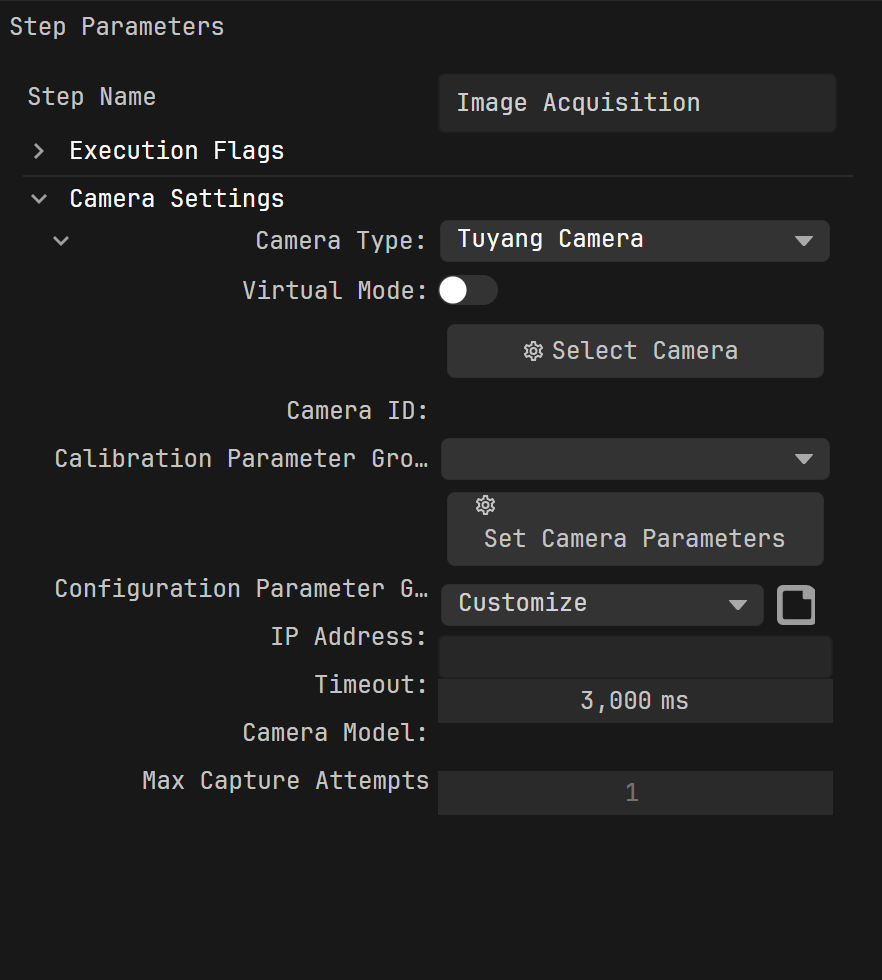
Select a step to modify its name, execution flags, and set up the step parameters.
The figure below shows the Step Parameters panel for the Image Acquisition Step:
Tip
You can hover over the parameter name to view its tooltip. For more, see View Step Parameter Tooltips.
Project Assistant
Select a step to configure the reference scene point cloud, parameter recipe, and data storage functions required for Step execution.
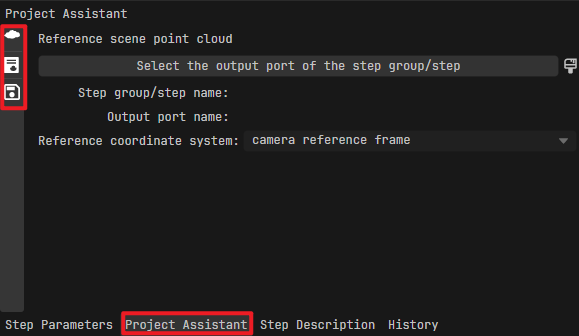
Click the left-side icons to switch between different tabs and view the following functions:
Reference scene point cloud: Select the input/output point cloud of a specific step as the scene point cloud for the current step. For more, see Select Scene Point Cloud.
Parameter recipe: Define parameter recipes for the current step. For more, see Set Parameter Recipes.
Note
Parameter recipes are predefined sets of parameter configurations for different runtime scenarios. By switching recipes, you can quickly adjust parameters without rebuilding the project.
Data storage: Save the output data, recipes, and step parameters of the current step to a local file. For more, see Save Data.
Step Description
Select a step to view its detailed description, including function, use cases, and input/output port information. For more, see View Step Description.
History
In this tab, you can view the operation history. Click an entry to quickly undo all operations after that entry.